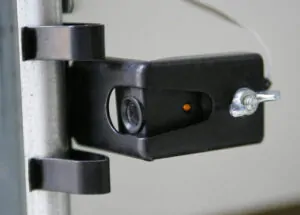
Chamberlain RJO101 Error codes and flashing codes
| Code | Diagnostic | Opener behavior | Solution |
| 1 Up – 1 Down | Sensors obstructed, misaligned, disconnected or broken wires | The garage door autoreverse and remains in the open position | Check the sensors |
| 1 Up – 2 Down | Wires reversed (white and black terminals) | The garage door autoreverse and remains in the open position | Check the sensor’s wiring |
| 1 Up – 3 Down | Control panel wires are shorted for more than 4 seconds | The opener works from the remote control and keypad but does not operate from the wall button | Check the wall button’s wiring |
| 1 Up – 4 Down | Safety sensors obstructed or misaligned | The garage door autoreverse and remains in the open position | Check the sensors |
| 1 Up – 5 Down | No RPM detected | The door does not move | Check chamberlain user manual |
| 1 Up – 6 Down | RPM detected after motor shut off at the open position | The garage door moves down after reaching the open position | Hire a professional technician |
| 2 Up – 1 Down | Logic board failure | The opener is not operating as expected | Disconnect the backup battery, if you have one, unplug the garage door opener for 10 seconds and plug it back. Replacement is needed if this step doesn’t work |
| 2 Up – 2 Down | Logic board failure | The opener is not operating as expected | The logic board needs a replacement |
| 2 Up – 3 Down | Logic board failure | The opener is not operating as expected | Disconnect the backup battery, if you have one, unplug the garage door opener for 10 seconds and plug it back. Replacement is needed if this step doesn’t work |
| 2 Up – 4 Down | Logic board failure | The opener is not operating as expected | The logic board needs a replacement |
| 2 Up – 5 Down | Logic board failure | The opener is not operating as expected | Disconnect the backup battery, if you have one, unplug the garage door opener for 10 seconds and plug it back. Replacement is needed if this step doesn’t work |
| 3 Up – 2 Down | The opener had a power outage and needs to locate the travel limit | The garage door is not closing fully | Reset travel limits |
| 3 Up – 3 Down | Logic board failure | Battery indicator light flashes green | Replace logic board |
| 3 Up – 5 Down | Cable tension monitor tripped or not detected | The garage door begins to close and reverses to the open limit or the garage door does not move and remains in the open position | Reinstall cable tension monitor or replace cables |
| 4 Up – 1 Down | Unforeseen change in RPM or DC Motor current while travelling in the DOWN direction. | The garage door reverses off of the garage floor and returns to the open position or the garage door stops and reverses before touching the garage floor and returns to the open position | Reprogram travel limits |
| 4 Up – 2 Down | Unforeseen change in RPM or DC Motor current while travelling in the UP direction. | The garage door stops before reaching a fully open position | Hardware problem (broken torsion spring, rollers, hinges, unbalanced or garage door out of alignment). Recommended a professional technician. |
| 4 Up – 3 Down | Loss of RPM during DOWN travel | The garage door stops and reverses before touching the garage floor and returns to the open position | Check motor bracket |
| 4 Up – 4 Down | Loss of RPM during UP travel | The garage door stops before reaching fully open position | Check motor bracket and chain/belt |
| 4 Up – 5 Down | Unrecognized Travel Module | The garage door begins to close and then reverses to the open position or the garage door does not move and remains at the open position. | Reset travel limits |
| 4 Up – 6 Down | A condition from Error Code 1-1 or 1-2 is existing and the opener was commanded to close. | The garage door starts in the fully open or stopped position and when the garage door begins to close, it reverses to the open position or the garage door does not move and remains at the open position. | Check the sensors |
| 5 Up – 5 Down | Opener receives an unattended open or close command and myQ Work Light is not installed/programmed. | The garage door does not move, remains at open or close position | Install and program the remote light to the garage door opener |
Chamberlain RJO101 Wall Mount Ultra-Quiet Wi-Fi® Garage Door Opener with Battery Backup

Chamberlain RJO101 is a great wall mount model that provides reliable and smooth operation for customers. The motor has battery backup and comes with safety sensors and other features:
- Wall-mounted design: Frees up ceiling space and reduces noise and vibrations in living spaces near the garage.
- Ultra-quiet operation: Our garage door opener is the quietest in the Chamberlain lines, ensuring peace and quiet in your home.
- Built-in Wi-Fi®: Allows for smartphone control with the free myQ app.
- Battery Backup: Lets you open and close your garage door even when the power is out.
- Remote LED Lighting: Illuminates your garage with full light coverage, and up to 8 light pods can be installed per unit, providing you with plenty of light.
- Automatic Garage Door Lock: Deadbolts your door after it closes every time.
- Works with Amazon Key and Walmart+ In-home: Enables convenient and secure in-garage delivery.
- BILT® Intelligent Instructions: 3D instructions for a quick, easy installation.
Specifications
| Lighting | Ultra Bright | GDO Learn Button Color Compatibility (Learn Button Color ) | Yellow / Circle | ||
| Drive Type | Direct Drive | AC / DC | DC | ||
| Battery Backup | Yes | Motion-Detection Light Activation | Yes | ||
| Security / Lock | Yes | Smartphone Control | Yes | ||
| Soft Start / Stop | Yes | Code Type Compatibility | Security+ 2.0 | ||
| Connectivity | 802.11 b/g/n (2.4GHz) |
Why choose side-mounted openers
Side-mounted garage door openers, also known as jackshaft openers, are an excellent choice for homeowners seeking a space-saving, quiet, and reliable solution. Installed on the wall beside the door, they free up ceiling space for storage or high-lift tracks—ideal for garages with low headroom or unique layouts. These openers offer smooth, quiet operation and improved safety with built-in security features and battery backup options. Their sleek, modern design adds a professional finish to any garage. Choosing a side-mounted opener means maximizing functionality without compromising performance, making it a smart investment for long-term convenience, efficiency, and enhanced garage organization.
How to program travel limits on a B4505TC
You can check through the manual on Chamberlain website.
Setting travel limits on your Chamberlain garage door opener ensures safe and efficient functionality. Here’s how to do it:
1. Locate the travel limit dials on the side or rear flap of the motor unit.
2. Begin with the door closed. Press and hold the ‘Up’ button until the door reaches the desired open position, then release.
3. After the desire position, press the black button to set the limit and start the down position.
4. Next, press and hold the ‘Down’ button until the door reaches the desired closed position, then release.
5. Press the black button to set the limit. In the new models, just wait until you hear 10 clicks and the door will open and close automatically to set the force. Make sure that nothing passes through the sensors during the force learning phase.
6. Test the door to ensure it opens and closes correctly.
If you face issues, check for obstructions, ensure sensors are aligned, and confirm the motor functions correctly. For persistent problems, consult the user manual or contact Chamberlain support. Properly programmed travel limits help maintain the safe and efficient operation of your garage door opener.

Warranty
- Accessory Warranty: 1 Year
- Motor Warranty: Lifetime
- Parts Warranty: 5 Years
- Drive Warranty: Lifetime
- Battery Warranty: 1 Year
- Camera Warranty: 1 Year
Why Chamberlain
Among the numerous options available, Chamberlain garage door openers stand out due to their innovative features and reliability. Whether you are considering an upgrade or installing a new system, understanding the various types of garage door openers and their specific advantages can help you make an informed decision. In this post, we will explore the top features of Chamberlain garage door openers, focusing on belt drive, chain drive, and wall-mounted models. Additionally, we’ll provide a guide on how to program a travel limit for these devices, ensuring optimal performance and safety.
If you need more information on Chamberlain garage door opener troubleshooting, check our blog or contact Motion Garage Doors at (437) 873-1407.